How to make a LinkedIn carousel
Quick answer
A LinkedIn carousel is a PDF that people swipe through. To make one:
- Pick one idea.
- Write one short idea per slide.
- Export all slides as one PDF.
- Post it with Add a document.
With CarouselSlide you can do the first three in a few minutes. No sign-up is needed to start.
LinkedIn has no carousel button. A carousel is a document post: you upload one PDF and each page becomes a slide. That is why the tool you use only has to export a PDF at the right size. This guide shows the steps, and how to do each one in CarouselSlide. Facts about LinkedIn’s file rules were checked on 2026-11-17.
Step 1: Pick one idea
Good carousels make one promise. Not “tips about hiring”, but “5 questions to ask before you hire a freelancer”. The reader should know in one second what they get for swiping.
Ask yourself two things:
- Who is this for?
- What will they know or be able to do at the end?
If you cannot say it in one line, the idea is too big. Split it into two carousels.
Step 2: Write the slides
Open the create page. Then:
- Type your topic in the box, for example “5 mistakes new freelancers make”.
- Under Post to, choose LinkedIn.
- Press Start carousel.
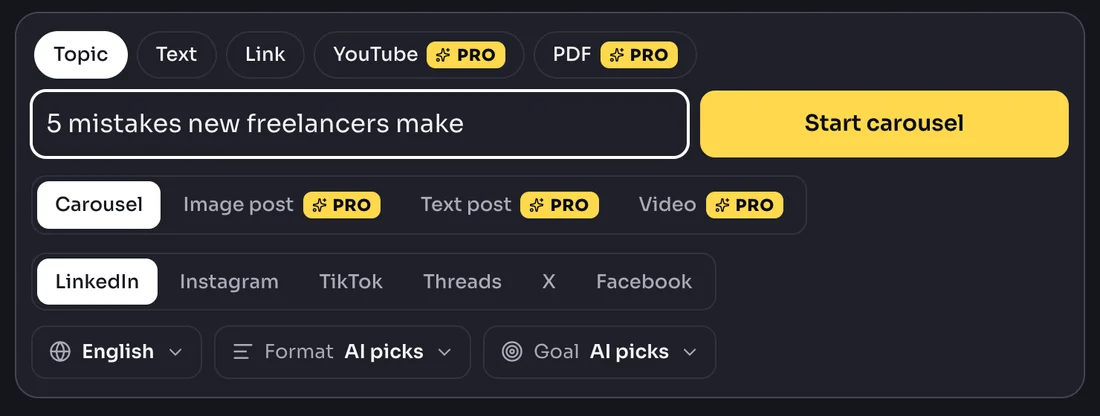
In about 30 seconds you get a first draft: a cover with a hook, one idea per slide and a last slide with a next step. You can also start from your own text, or from a link to an article.
If you would rather write it yourself, here is a simple shape:
| Slide | What goes on it |
|---|---|
| 1 | The promise, in under ten words |
| 2 | Why it matters, in one line |
| 3 to 8 | One idea each, with a short headline and one or two lines |
| Last | One next step, such as “Follow for more” or “Save this” |
Step 3: Edit every word
The first draft is a start. Read each slide out loud and cut it down.
- One idea per slide. If a slide needs “and”, split it.
- Short words. Short sentences.
- No slide with more than about 30 words.
- Keep the first slide sharp. It is the only one everyone sees.
In the editor you can click any text and change it. The free plan allows up to 8 slides. Pro allows up to 20.
Step 4: Add your name and photo
Put your name, handle and photo on the slides. People forward good carousels, and your name should travel with it. The free plan has name, handle and photo. Pro adds a logo, colors and fonts.
Step 5: Download the PDF
Choose Download, then PDF document. CarouselSlide sizes every slide at 1080 x 1350 for LinkedIn, so every page is the same size. The free plan puts a small mark on each slide. Pro has no mark.
Open the PDF on your phone and swipe through it. Is every slide readable at arm’s length? If yes, it is ready. The full size and file rules are in our LinkedIn carousel size guide.
Step 6: Post it as a document
- In LinkedIn, start a post.
- Choose Add a document and pick your PDF.
- Give the document a title.
- Write a short caption. Put the reason to swipe in the first line, because LinkedIn cuts long captions with “…more”.
- Post.
On Pro you can also post from the editor, now or at a set time.
Mistakes to avoid
- Too many ideas. One carousel, one promise.
- A cover with only a logo. Put the promise there.
- Small text. If you must zoom in on your own phone, it is too small.
- Too many slides. See how many slides work best.
- No next step. End with one clear thing to do.
Make yours now
If you want to skip the blank page, type your topic and edit the result. The free plan makes 3 AI carousels a month. You can see our limits on the LinkedIn carousel generator page.
Sources
LinkedIn’s help page “Upload and share documents on LinkedIn” gives the file rules: PDF and other document types, 100 MB, 300 pages, one page size per file. The slide ideas, word counts and caption advice are our own rules of thumb, not LinkedIn’s. Facts checked on 2026-11-17.
Questions people ask
How do I make a carousel on LinkedIn?
Make your slides as one PDF, then start a LinkedIn post, choose Add a document, pick the PDF and write a caption. Each page of the PDF becomes one slide.
Do I need Canva to make a LinkedIn carousel?
No. Any tool that exports a PDF works. In CarouselSlide you type a topic, edit the slides and download the PDF. No design skills are needed.
How long does it take?
Writing the slides by hand takes an hour or more. With CarouselSlide, the first draft takes about 30 seconds, and then you edit the words.
How many slides should it have?
6 to 12 is a good range for most topics. See our guide on slide count for the reasons.
Can I make a LinkedIn carousel for free?
Yes. The CarouselSlide free plan makes 3 AI carousels a month, up to 8 slides each, and the PDF has a small watermark.
What caption should I write?
Two or three short lines. LinkedIn cuts a long caption at a fold, so put the reason to swipe in the first line.